


Source: pathdoc/Shutterstock.com
Data loss can strike when you least expect it. Whether it’s cherished photos, critical work documents, or financial records, that sinking feeling when you realize important files have vanished is universal. However, before panic sets in, it’s important to understand that, in many cases, “deleted” doesn’t necessarily mean “gone forever.”
This guide explores the key factors that determine whether your lost data can be recovered and the best methods for different scenarios. When standard solutions fail, a tech support membership or data recovery service may be your best option for retrieving valuable files from damaged or inaccessible storage devices. Knowing when to seek professional help can make the difference between recovery and permanent loss.
Understanding Data Loss Causes and Their Impact on Recoverability
Data loss is more common than you might think — 96 percent of businesses experience data loss, and 50 percent of them never recover from it. Whether due to accidental deletion, hardware failure, or malicious attacks, losing critical files can have significant consequences. Understanding the root cause of data loss is the first step in determining whether recovery is possible and what methods will be most effective.
Accidental Deletion
When files are accidentally deleted, they typically aren’t immediately erased from your storage device. Instead, the space they occupy is simply marked as available for new data. For recent deletions, something as simple as pressing Ctrl+Z or using the “Undo Delete” function might restore your files. Files sent to the Recycle Bin can be easily restored, but if you’ve emptied the Recycle Bin or permanently deleted files, recovery becomes more complex yet remains possible with appropriate software tools. To minimize the risk of permanent data loss, implementing data backup strategies ensures you always have copies of important files in case of accidental deletion.
Hardware Failure
Hardware failures can be either logical or physical in nature. Logical failures involve issues with how the system accesses data, such as corrupted file systems or partition tables. These typically have higher recovery rates using specialized software. Physical failures involve actual damage to drive components and usually require professional intervention. Signs of impending hardware failure might include unusual noises, slow performance, or frequent crashes.
Software Corruption
Files can become corrupted due to system crashes, virus attacks, or mistaken operations. Corrupted files are typically unusable in their current state. Recovery prospects depend on the extent of corruption — minor corruption might be fixable through system tools or specialized software, while severe corruption may render files partially or completely unrecoverable.
Malware and Virus Attacks
Malware can delete, encrypt, or corrupt your files. Recovery success after a malware attack depends on whether the malware deleted files (potentially recoverable) or overwrote them with garbage data (more challenging to recover). After a malware attack, it’s crucial to remove the malware, reset passwords, and update all software before attempting recovery to prevent reinfection. If your system is frequently exposed to malware threats, investing in a tech support membership can provide ongoing security monitoring, system maintenance, and professional assistance to prevent future attacks.
Physical Damage
Physical damage to storage devices from drops, water exposure, fire, or electrical surges often results in the most challenging recovery scenarios. Recovery prospects depend on the extent and nature of the damage. Professional data recovery services with clean room facilities offer the best chance of recovery in these cases.
Storage Device Types and Recovery Possibilities
Different storage technologies have unique characteristics that affect data recovery:
Hard Disk Drives (HDDs)
Traditional HDDs store data magnetically on spinning platters. This makes them generally more recoverable than other storage types because:
- When files are deleted, they remain physically on the disk until overwritten
- Well-established recovery techniques exist for HDDs
- Even partially damaged HDDs may allow for partial data recovery
However, physical failures involving platter damage or head crashes can make recovery extremely difficult.
Solid State Drives (SSDs)
SSDs present unique recovery challenges due to:
- TRIM functionality that may erase deleted data blocks for performance reasons
- Wear-leveling algorithms that distribute data across the drive
- More complex internal architecture
Recovery is often possible but may be less successful than with HDDs, particularly if substantial time has passed since deletion.
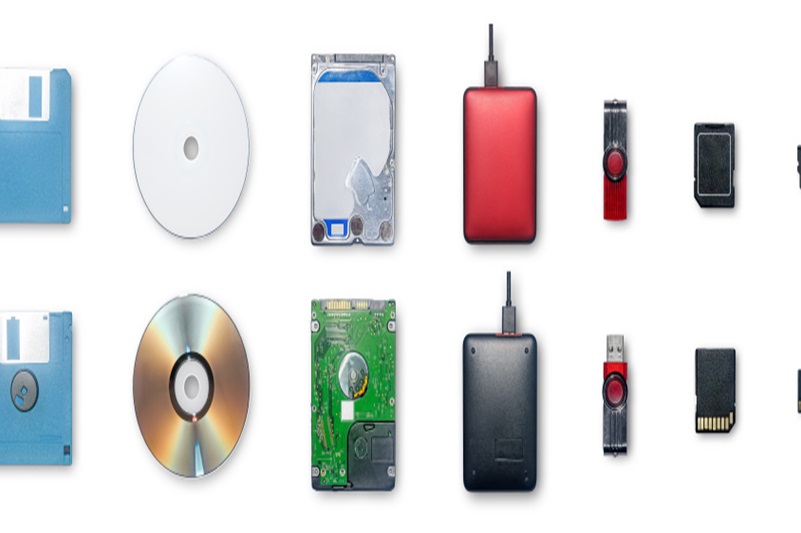
Source: Kirin Phanithi/Shutterstock.com
USB Flash Drives and SD Cards
These portable storage devices can often be recovered using standard data recovery software. However, their frequent use and removal can lead to physical connector damage or logical corruption. The success rate depends on whether the device is still readable by the computer system.
RAID Systems
RAID arrays add complexity to recovery due to how data is distributed across multiple drives. Recovery requires specialized knowledge of the specific RAID configuration. If only one drive in a redundant array fails, data is typically recoverable, but multiple drive failures may lead to permanent data loss.
Cloud Storage
Cloud storage recovery depends entirely on the provider’s policies and backup systems. Many services offer 30-day recovery windows for deleted files, while others maintain more extensive version histories.
The Critical Factor: Post-Loss Device Usage
Perhaps the single most important factor determining recovery success is what happens to the storage device after data loss occurs:
- If you continue using the device, new data might overwrite the “deleted” data, making recovery impossible.
- Installing recovery software on the affected drive can potentially overwrite the very files you’re trying to recover.
- Every write operation to the device reduces recovery chances.
Immediate Steps After Data Loss
If you experience data loss:
- Stop using the device immediately
- Don’t save new files to the affected storage
- Don’t install recovery software directly to the affected drive
- If possible, remove the drive and connect it as a secondary device to another computer
- Use a different storage device for any recovery software installation
Available Recovery Methods by Scenario
Several recovery approaches exist, each suited to different data loss scenarios:
Built-in System Recovery Tools
Modern operating systems include several built-in recovery options:
- Previous Versions Feature: Windows allows you to restore previous versions of files in some configurations
- System Restore: Can recover system files and settings from a restore point
- Undo Delete/Ctrl+Z: Works for very recent deletions before the application or system is closed
- Recycle Bin: Contains recently deleted files until emptied
These methods are best for recent, simple data loss scenarios and require no additional software.
Third-Party Software Solutions
Specialized software can scan storage devices for more complex recovery needs to locate and recover deleted or lost files. These tools scan the storage device for file signatures and remnants of deleted files and then reconstruct them when possible.
Professional Data Recovery Services
For severe cases, particularly those involving physical damage or critical data, professional recovery services offer the highest success rates:
- They employ specialized equipment and clean-room environments
- Can address both logical and physical failures
- May be able to recover data from severely damaged media
- Typically more expensive but provide expertise for complex scenarios
Professional services are recommended when the system does not detect the storage device, you hear unusual noises from a hard drive, the device has suffered physical damage, or the data is extremely valuable and warrants additional expense.
File Systems and Encryption: How They Affect Recovery
The underlying file system and any encryption can significantly impact recovery possibilities:
Common File Systems
The file system’s complexity and features directly influence how thoroughly data can be recovered after deletion or corruption.
- NTFS (Windows): Generally provides good recovery prospects due to its journal and Master File Table
- FAT32 (Older Windows/cross-platform): Simpler structure but fewer recovery features
- APFS (Apple): Modern file system with snapshots that can aid recovery
- EXT4 (Linux): Journaling file system with moderate recovery possibilities
Encryption Impact
Encrypted storage presents a significant additional challenge for recovery:
- If you have the encryption key/password, recovery software can often still recover files
- Without the key, recovered data will remain encrypted and unusable
- Full-disk encryption may prevent access to the drive entirely without proper authentication
- File-level encryption may allow recovery of file structures but not contents

Source: Thapana_Studio/Shutterstock.com
Additional Factors Influencing Recovery Success
Several other factors play important roles in determining recovery likelihood:
File Size and Type Considerations
Some file types are more easily recoverable than others:
- Simple file types (text, basic images) often recover more completely
- Fragmented large files may recover incompletely
- Database files may be useless if even small portions are unrecoverable
- The interdependence of data affects recovery value — even 90 percent recovery may be inadequate for certain data types
Time Since Deletion: The Decay Factor
The longer the time since data loss, the lower the chances of successful recovery:
- Immediately after deletion: Highest recovery probability
- Days later: Reduced chances as normal system operations may overwrite data
- Weeks later: Significantly diminished prospects
- Recovery outcome is usually worth less with each passing day or hour
SMART Data and Drive Health Assessment
For HDDs and SSDs, examining SMART (Self-Monitoring, Analysis, and Reporting Technology) data can indicate:
- Current drive health
- Potential for imminent failure
- Presence of bad sectors or other issues affecting recovery
- Whether physical recovery is needed before logical recovery attempts
The Backup Safety Net
Restoring from a backup is always preferable to recovery attempts when possible. Always check if backups exist before attempting recovery:
- Cloud backups (Dropbox, Google Drive, OneDrive, etc.)
- Local backups (Time Machine, Windows Backup, etc.)
- Email attachments of important documents
- Other devices where files might have been synchronized
Legal and Security Considerations
Data recovery may involve legal and security implications:
- Corporate data may be subject to regulations about recovery methods
- Personal data privacy concerns should be considered when using third-party services
- Recovered confidential information requires proper security handling
- Some recovery attempts might violate terms of service or warranties
From Loss to Recovery: Key Takeaways for Recovery Success
Determining whether lost data is recoverable involves assessing multiple factors including the cause of loss, storage type, post-loss usage, and available recovery methods. While there are no guarantees, understanding these factors helps you make informed decisions about recovery attempts.
Remember these key principles:
- Act quickly and stop using the affected device
- Choose the appropriate recovery method based on your specific scenario
- Consider the value of the data versus the recovery cost
- Implement a robust backup strategy to prevent future data loss situations
By understanding the recoverability factors outlined in this guide, you’ll be better equipped to assess your situation and take the appropriate steps toward recovering your valuable data. The good news is that, with the right approach, what seems lost can often be found again.

Comments are closed.